How I reimagined YouTube’s subscriptions tab to help users better organize channels and consume content based on their personal interests.
Product
Web App
Responsibilities
User research, Design Thinking, Wireframing, UI Design, Prototyping, User testing
Timeline
Sep 2025
Team
Vipin
Links
Problem discovery
One day, I was watching a video from a small design channel with very few 1000+ subscribers. I loved the content and subscribed, planning to come back later and binge their videos.
A week later, I wanted to revisit the channel, but here’s the catch: I couldn’t remember the channel’s name or the video title, only that it was design-related. You might think, “Just check your watch history.” I tried that, but over the week I had watched so many videos that they stacked up, and finding that particular one was nearly impossible. So..
I headed to the Subscriptions tab, expecting to spot it quickly. Instead, I found a long, unorganized list of channels from every niche of Gaming, Design, Coding, Trading — all mixed together. Finding that one channel felt super hard.
Potential problems with YouTube’s current Subscriptions tab:
-- For users subscribed to 100+ channels, the existing filter options (A–Z, Most relevant, New activity) are basic and time-based, not category or content-based.
-- As a content-first platform, YouTube gives users the power to subscribe but no way to organize what they’ve subscribed to.
“YouTube empowers us to follow content we love, but fails to help us manage and rediscover it efficiently”
As a user and a designer, this felt like a missed opportunity. But before jumping into solutions, I had a few questions in mind:
-- 🤔 Is this problem just something I’m facing, or do others feel the same? If it affects many users, who are they?
-- 🤔 If they’re struggling with it, how are they currently solving it?
User research
To validate my assumptions, I started with secondary research. I searched Google for: “How to organize my YouTube subscription channels.” A number of videos popped up. I watched several, and most suggested one of three things:
-- Use extensions like PocketTube to organize channels.
-- Unsubscribe from channels you no longer watch to clean up the tab.
-- Save videos to playlists and label them by genre (eg., Gaming, Design)
These didn’t feel like real solutions, they were just workarounds.
Since PocketTube was mentioned often, I wanted to check if users actually loved the grouping feature or if it was just another unused option. Reading through their reviews, the response was overwhelmingly positive, and users praised the ability to organize channels into meaningful categories. This confirmed that grouping subscriptions wasn’t just a niche idea but a highly valued feature with strong adoption potential.
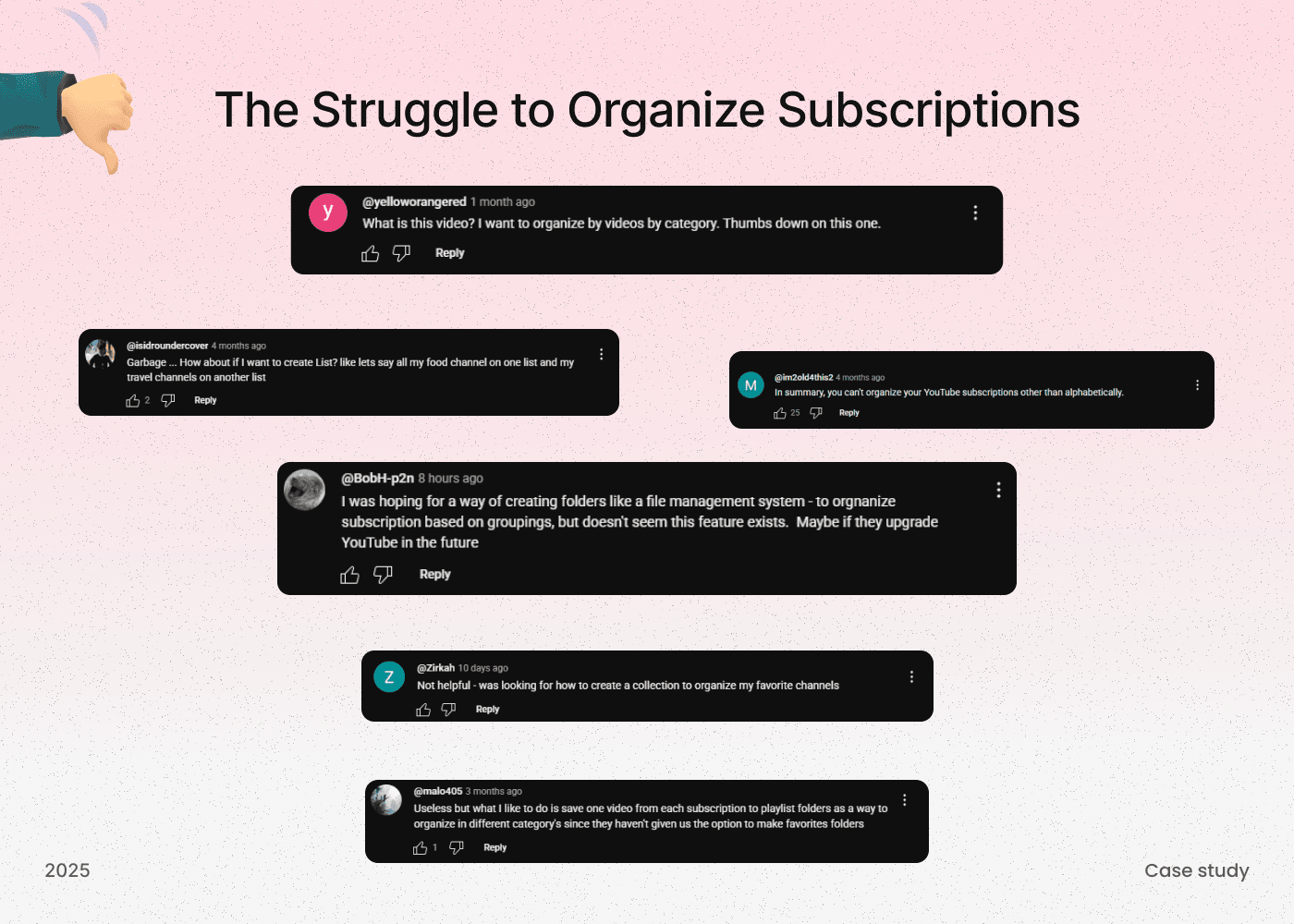
Then I dug into the YouTube comment sections under those videos, and that’s where the real issues became obvious. Here are some highlighted comments.
Problem statement
Over time, users tend to subscribe to dozens, sometimes even hundreds, of YouTube channels across various niches like Design, Coding, Vlogs, and more. But when it comes to finding content by category or interest, the subscriptions tab becomes visually overwhelming and hard to navigate.
Some users rely on third-party Chrome extensions like PocketTube to manually organize their subscriptions, while others wish they had a native way to group or tag their channels, much like how content is organized in Notion or playlists in Spotify.
Sometimes, users don’t want to browse all their subscriptions; they just want to watch content from a specific niche (for example, someone may want to watch only Design videos from their subscribed channels).
The current YouTube filters (A–Z, Most Relevant, New Activity) are too basic and fail to address real-world use cases. By enabling users to group, tag, and manage their subscriptions more effectively, we can significantly improve the overall content discovery experience inside the Subscriptions tab.
Inspiration from other content-based platforms
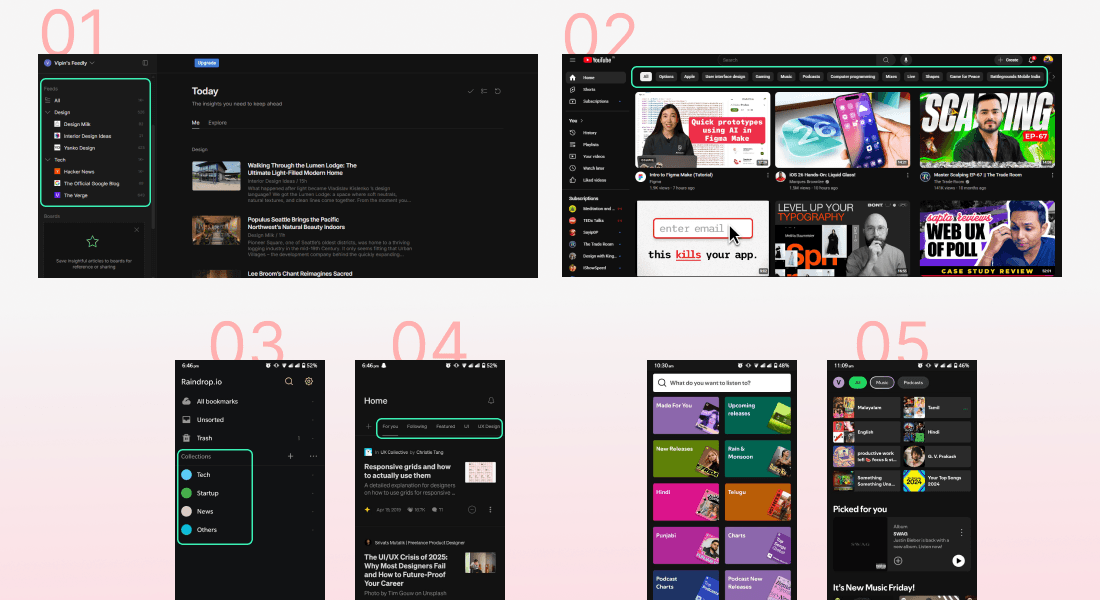
To understand how other content-heavy platforms handle organization, I explored apps like Spotify, Medium, and Feedly (Apps that I use on a day-to-day basis). Each offers unique ways to group and personalize content, helping users improve discovery and maintain focus.
Here’s how real-world apps approach content grouping and discoverability.
Inspiration thoughts
Feedly
allows organizing reading material into collections, with a sleek left sidebar to access them.
This can be an inspiration for introducing a side navigation system inside YouTube's Subscriptions tab to quickly access grouped channels.
YouTube
already uses smart content tags (e.g., “AI”, “Gaming”, “Finance”) in the Home feed, based on user behavior.
A similar tagging system could improve discoverability inside Subscriptions by surfacing channels/content from specific niches.
Raindrop
I recently started using Raindrop and loved how it lets users organize content using folders and tags.
This can be used as a reference for letting YouTube users group their subscriptions into meaningful collections and add tags for faster access.
Medium
uses a segmented control at the top (like “For You”, “Following”) to switch views.
This could be applied in the Subscriptions tab with tabs like “All” and “Collections” for better content switching.
Redesign
Improved side navigation for subscriptions, Add channels to collections, Improved “All subscriptions/Your channels” Tab, Collections tab.
Improved side navigation
Problem with current experience
The current Subscriptions sidebar shows only 5–6 recently subscribed channels before hiding the rest behind a “Show More” button. For users with 100+ channels, accessing all subscriptions feels unnecessarily tedious
-- Click “Show more”
-- Scroll to the very bottom
-- Click “All/Manage subscriptions”
On top of that, there’s no way to filter channels by niche or category; it’s just one long, unorganized list. This increases cognitive load and slows down discovery.
Design improvements
-- Direct access to All/Manage subscriptions. The “Subscriptions” label now functions as a direct button to the Manage Subscriptions page, removing the need for deep scrolling.
-- Collections dropdown for better organization. By default, users still see their top 5-6 channels. Expanding reveals user-centered collections like “Design”, “Coding”, “Vlogs” etc. Selecting a collections instantly filters the sidebar to show only relevant channels.
-- Each collection shows a count of channels (eg.., All -125, Design - 24) for instant context.
Add channel to collections (At the time of channel discovery)
Problem with current experience
-- After hitting subscribe, YouTube simply changes the button state - no prompt, no organization.
-- Users who want to find channels later have to dig through their entire subscription list, with no built in system to group by niche or interest.
Design improvements
-- Instant categorization: When a user clicks Subscribe, a Collection popup appears immediately, letting them assign the channel to an existing collection (e.g., Design, Fitness, Coding) or create a new one on the spot.
-- Flexible: If they skip the popup, an “Add to Collection” button appears next to the Subscribe button, allowing them to organize the channel anytime later.
-- Low friction moment: Organizing content at the moment of discovery is the lowest friction moment. Users still remember why they liked the channel. Reduces the mess later and makes niche-based content retrieval effortless.
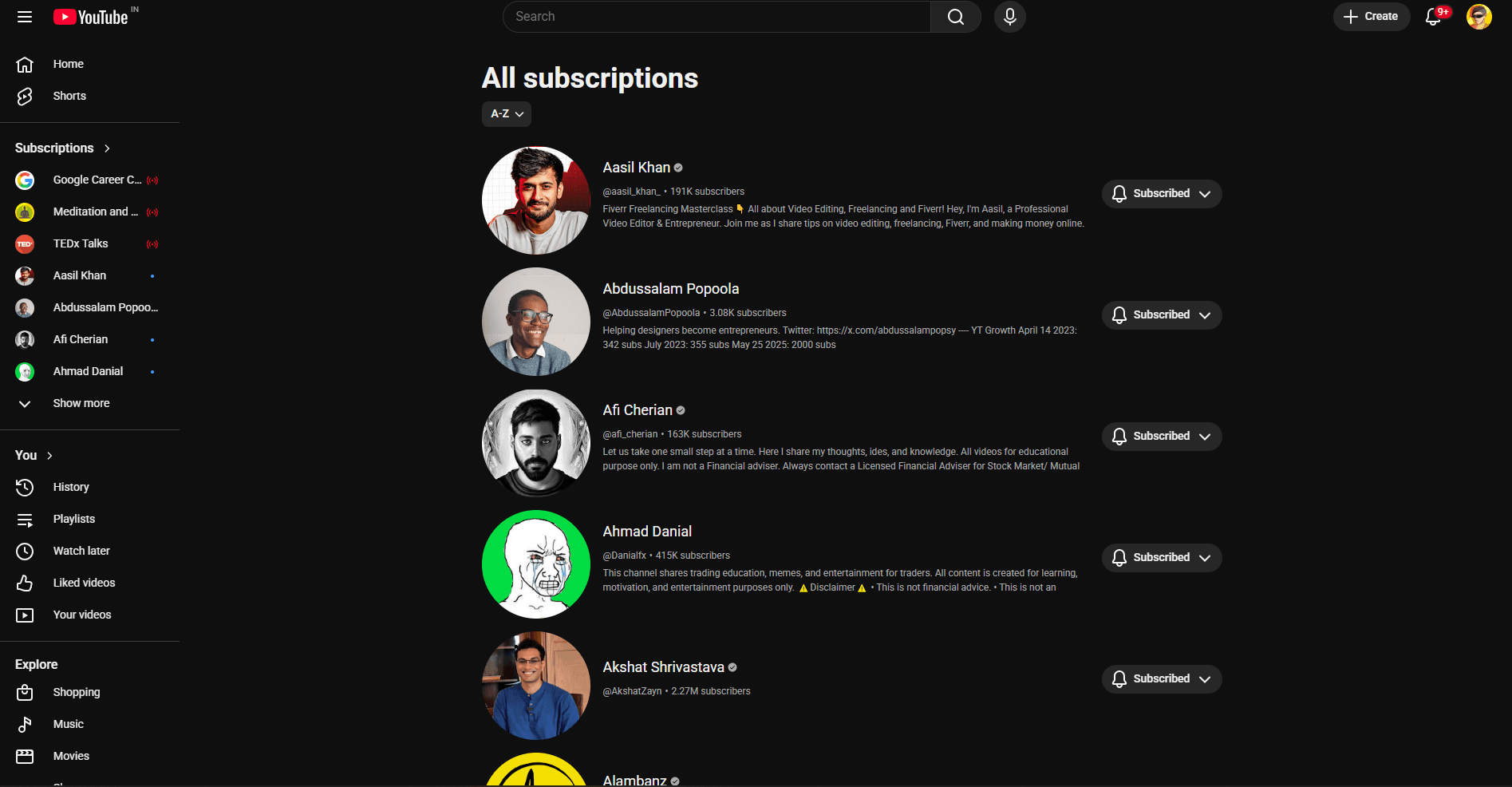
Improved "All subscriptions tab"
Problem with current experience
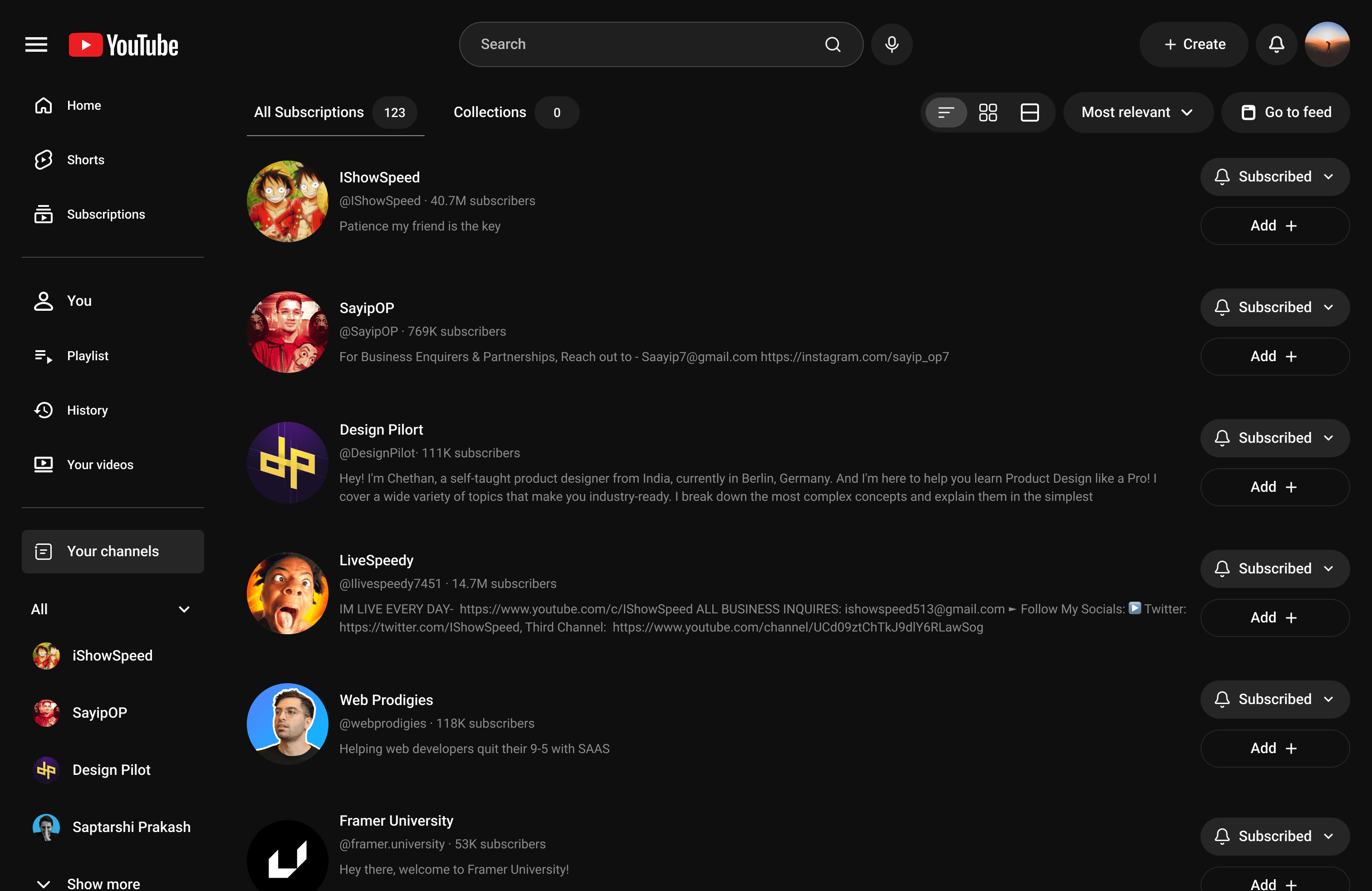
-- Displays all subscribed channels in a space-consuming list view, showing only 4-5 channels at a time, even on large screens.
-- Only three filter options (Most relevant, New Activity, A-Z)
-- No way to directly view content from subscribed channels within this tab.
Design improvements
-- A top level tab switcher: All Subscriptions (current layout) and collections each channel gets a “+Add” button to quickly add it a collection.
-- Offer three view modes: List, Grid, and Compact to let users see more channels at a glance without endless scrolling.
-- A direct “Go to feed” button to jump straight to that channel’s subscription feed.
New feature
Collections tab
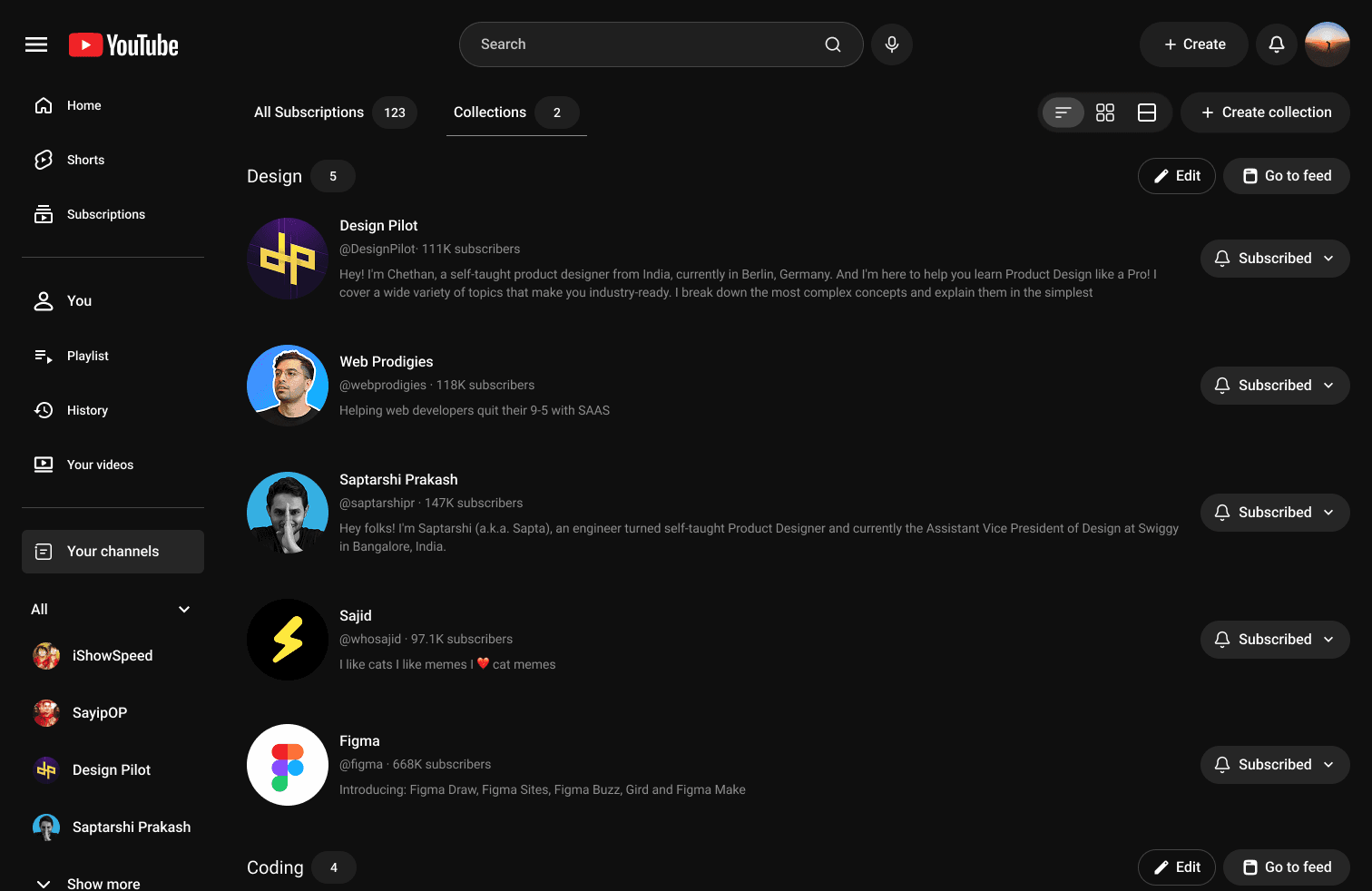
-- Display all user-created collections (e.g., Design, Coding, Vlogs) in an organized grid or list.
-- Each collection card has Edit (rename or manage channels) and Go to Feed (view a personalized feed for that collection).
-- Inside the collections tab, users can switch between groups using familiar chip-style buttons (like those on YouTube’s homepage) for quick, intuitive navigation.
-- Add a Mix button that includes videos from unsubscribed but related channels, keeping feeds fresh even if a collection has few updates.
-- Include a Tab Switcher button to toggle instantly between “All Subscriptions” and “Collections” for better control over content consumption.
Creating collections
Viewing collections
Usability testing
Collections tab (Direct channel remove)
Problem
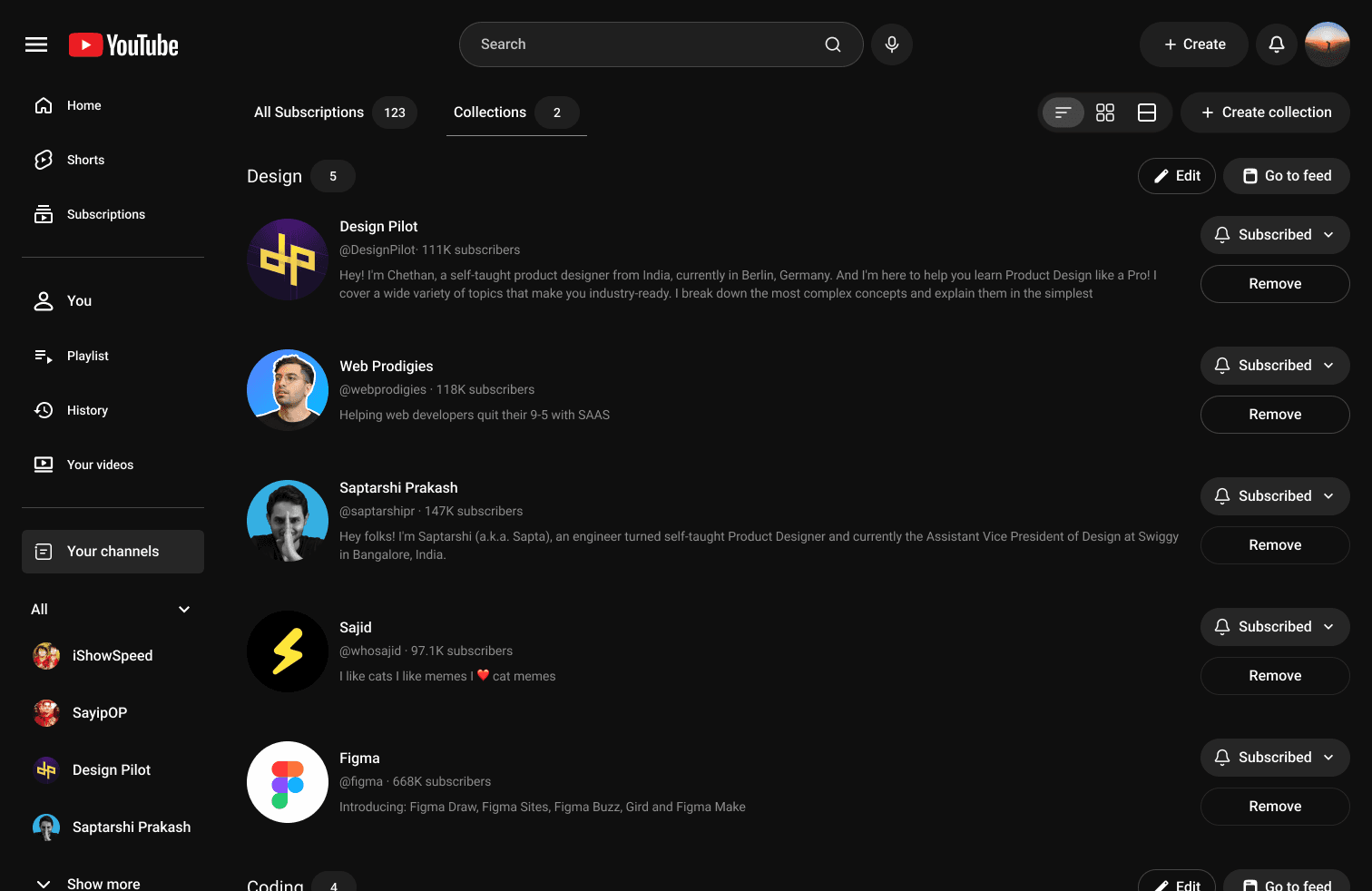
Users found it cumbersome to remove channels, as they had to tap “Edit” before removing each one. This added friction to a task that should be quick and lightweight.
Solution
Added a direct “Remove” button below the “Subscribed” button on each channel card, along with a confirmation pop-up: “Are you sure you want to remove this channel from the XYZ collection”
Add to collection clarity
Problem
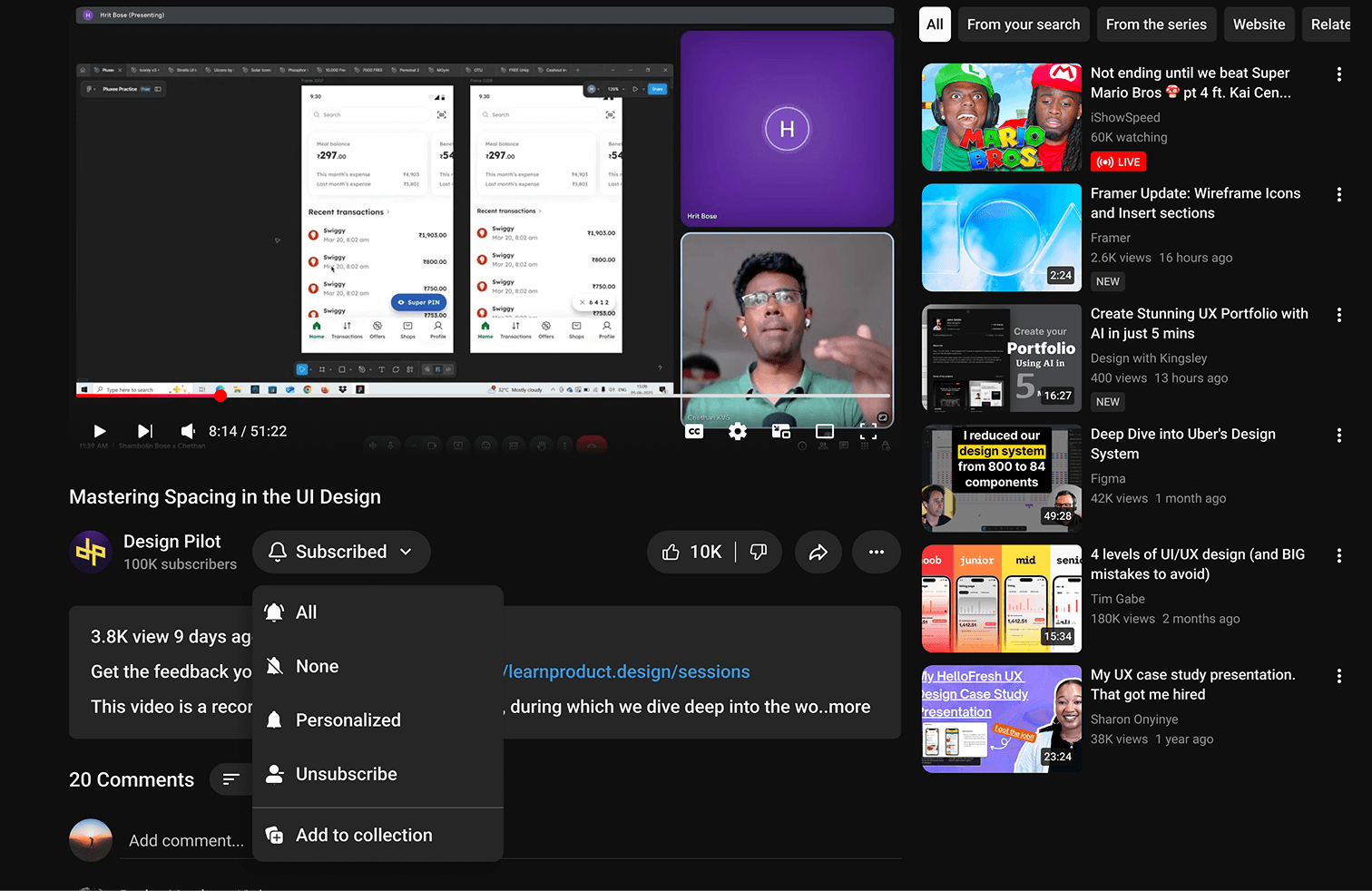
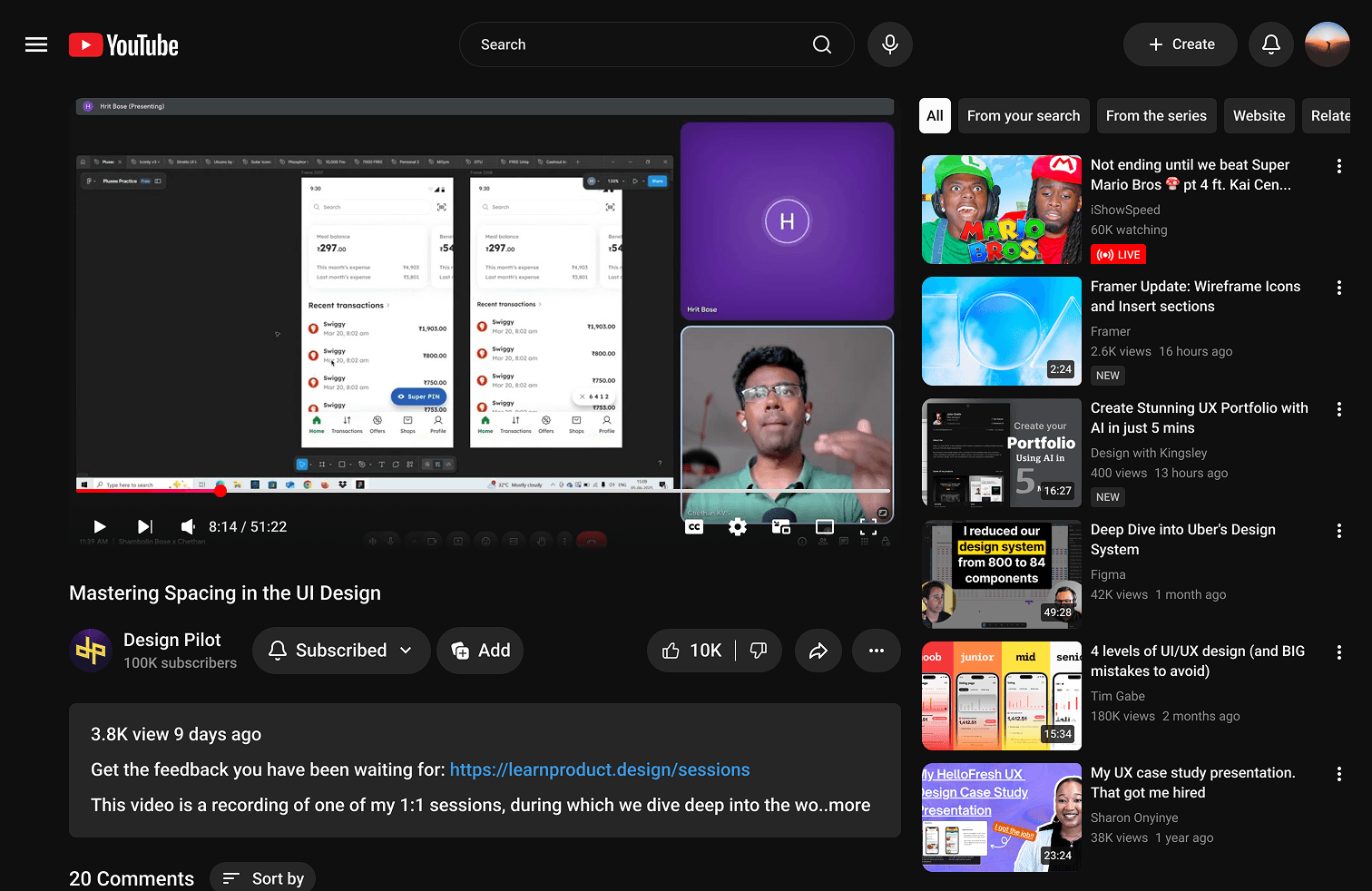
Users felt unsure about how to add a channel to a collection if they skipped doing so during the initial discovery. They assumed there was no option to add it later while watching a video.
In reality, the “Add to Collection” option existed, but it was hidden inside the subscribed dropdown, making it difficult to notice.
Solution
To improve discoverability, I placed an “Add” button with a collection icon directly next to the Subscribed button. On hover, a tooltip appears: “Organize your subscriptions into collections.”
This made it easier for users to find and use the feature, significantly reducing confusion and friction.
Conclusion
That’s a wrap!!! Thanks for reading my case study. If you’re curious, you can explore the interactive prototype [here]